
Password reset is not incident response.
Hunting OAuth persistence in Microsoft 365 — and the cleanup steps that actually evict the attacker.
 oauth.bardsec.com
 AL
AL
Andy Lombardo
K12 Tech Director · K12 Security Information Exchange (K12 SIX) · SupportStudioK12 Founder · Security Awareness Content Creator. I publish at these sites — pick whichever matches your itch.
The Step 05 audit, tooled.
OAuth-app auditing is the kind of work that gets skipped because it's tedious. App Hunter is the open-source tool I built so it doesn't have to be.
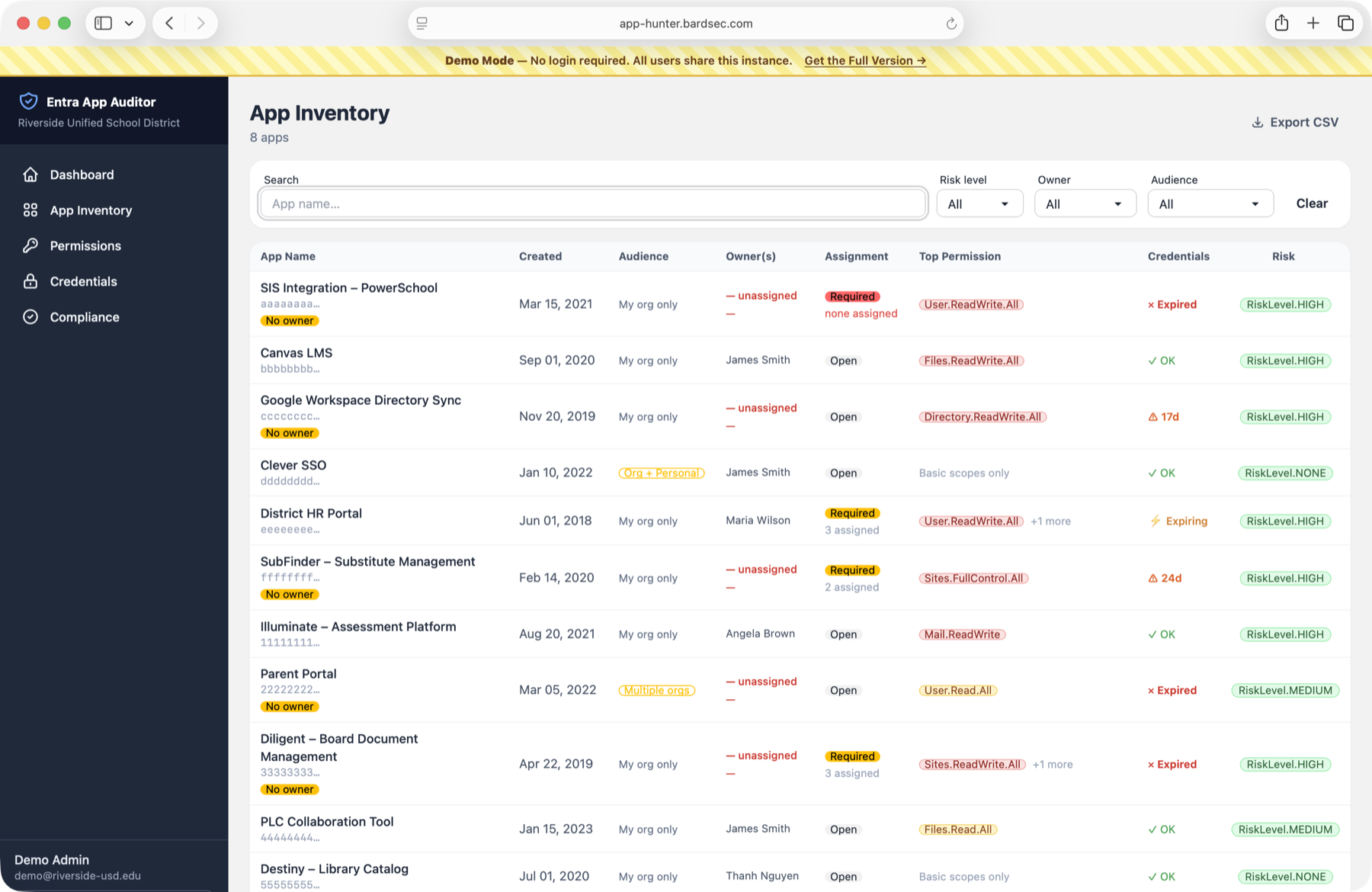
- What A Flask web app that ingests your tenant's OAuth apps and surfaces what your eyes would miss — RiskLevel.HIGH, unowned apps, expired credentials, high-impact scopes.
- Why Because the Entra portal makes you click through every app one at a time. App Hunter gives you the whole inventory at a glance — filterable by risk, audience, owner, and permissions.
- License Open source. Self-hostable. K12-friendly.
OAuth persistence inside Entra ID.
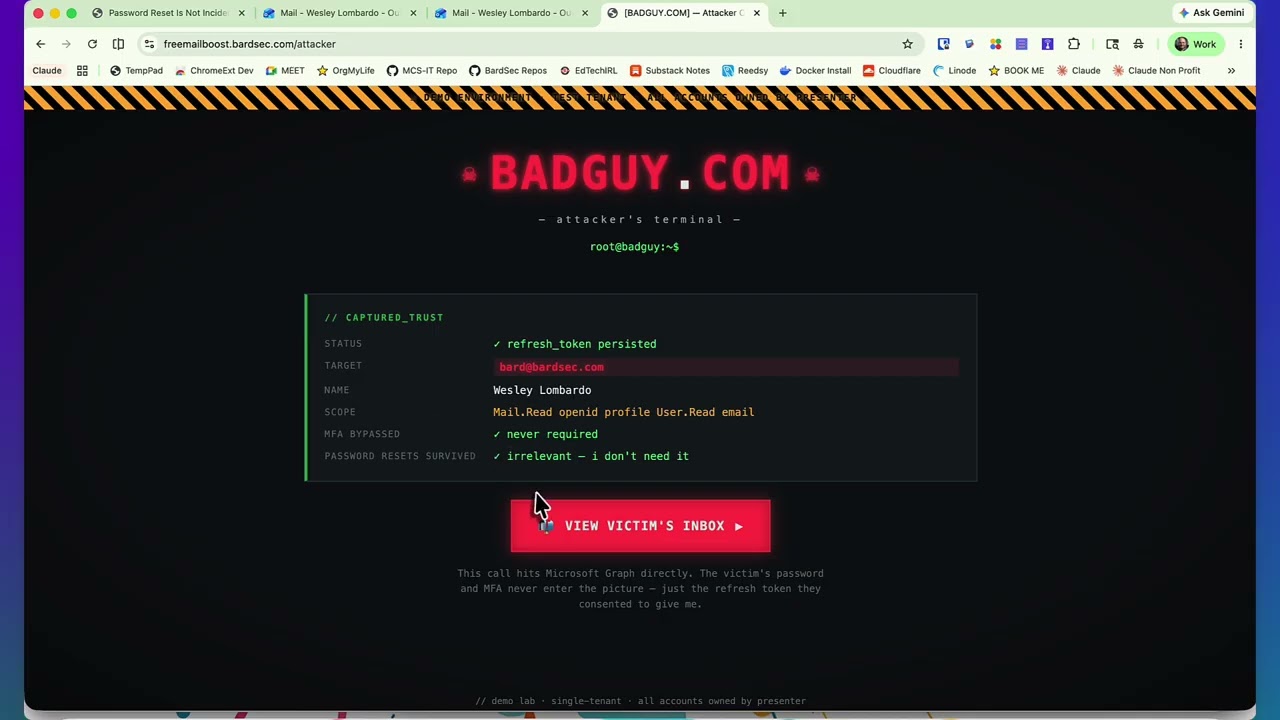
Watch the consent grant survive a password reset — then watch the proper eviction make it stop.
If the embed misbehaves: open on YouTube
-
0:00
Attacker tricks user into consenting to a "Microsoft Support Service" app with
Mail.ReadWriteandoffline_access. - 1:38 Attacker uses the refresh token to read mailbox via Graph from their own infrastructure. No interactive login.
- 2:25 Defender removes the Enterprise Application. Service principal gone. Access fully evicted.
Token theft with AitM.
The phish that survives MFA. Evilginx-style reverse proxy, real Microsoft login, real MFA prompt — token siphoned in the middle.
If the embed misbehaves: open on YouTube

- 0:00 Phish email lands. Link looks legitimate — different TLD, but plausible.
- 0:25 User clicks. Reverse proxy serves the real Microsoft login page. URL is the attacker's — UI is Microsoft's.
- 0:55 User enters credentials. MFA prompt appears on their phone. User approves — it is the real login.
- 1:20 Authentication completes. Attacker now holds the user's session cookie and a fresh refresh token.
- 2:00 Attacker replays the cookie from a different country. Already in. MFA was satisfied — for them.
Further reading: Why is Phish-resistant MFA Important? · Becoming the Adversary in the Middle
Ten steps, fully written out.
For after the talk — bookmark, copy, share with your incident-response runbook.
-
Disable the account
Blocking sign-in is the top priority — it gives you time to do everything else without racing the attacker. Disable the account does not, on its own, evict an attacker who's already established persistence below.
If you sync identities from on-prem AD, disable the account locally too — otherwise AD's next sync will re-enable it.
-
Revoke sessions
"Revoke sessions" in Entra ID does double duty: it kills active sign-in sessions and invalidates refresh-token reuse, forcing reauthentication across apps. Without this, your password reset is theatrical — the attacker keeps minting fresh access tokens.
Propagation across M365 services can take several minutes.
-
Change the password
The least effective single step, but still necessary so the attacker can't sign in interactively later. Remember to disable on-prem AD if you sync identities, otherwise the next sync may re-enable.
-
Audit MFA methods (and do NOT require re-registration yet)
Verify each authentication method is one the user owns. Check for newly added passwordless methods or suspicious Temporary Access Pass issuance — these are how attackers regain access immediately after the account is re-enabled.
If an attacker added an MFA method and you require re-registration, they may be the one who completes it.
-
Audit app registrations & revoke OAuth refresh tokens
This is the step that's most often skipped — and the one that turns a recovered account into a still-compromised one. Audit Defender for Cloud Apps (if licensed) for "Rare apps with high permissions." Check Entra ID → Users → [user] → Applications, and Enterprise Applications for tenant-wide consent.
Disable or delete suspicious apps. Run
Revoke-MgUserSignInSession. Remove the underlying consent grant — revoking tokens alone is temporary if the consent remains. -
Delegate mailbox access for investigation
Delegate Read & Manage in Exchange Online so you can investigate without generating misleading "user logged in" entries in the audit logs. While you're there, check existing delegate permissions for anything illegitimate.
Remove your delegated access when the investigation is complete.
-
Audit inbox rules
Inbox rules are persistence-light. A forwarding rule to a Gmail address keeps the attacker reading mail even when their other access is gone. Rules that send certain conversations to obscure folders (RSS Subscriptions is common) are used to hide vendor / bank impersonation threads.
The classic malicious rule name is a single period:
. -
Audit forwarding rules
Block external forwarding tenant-wide if you can. If not, alert when new forwarding is configured (Blumira offers a free SIEM for M365 if you don't already have one). The Exchange Admin Center's Reports → Mail Flow → Auto-forwarded report shows current external forwarding.
-
Audit mail folders
Search Archive, Drafts, Sent, Deleted, and unusual subfolders for conversations the user doesn't recognize — particularly anything from vendors, banks, or finance addresses. The attacker often carries on a conversation in parallel using the compromised identity.
-
Audit sign-in logs
Pay special attention to non-interactive sign-ins, which usually indicate token-based access rather than a normal user login. Pivot on IP, user agent, app, and ASN. A user agent like Python-requests trying to hit the Azure portal is rarely your user's behavior.
If an ASN is unusual (e.g., M246 / ASN 9009), look for the same ASN in other users' sign-in logs to find related compromises.
§ Broader cleanup · after the mailbox is secured
- Verify the user wasn't added to privileged roles or groups.
- Review Conditional Access and security policy changes for weakening or new exclusions.
- Ensure the user's primary device is clean (infostealers cause immediate re-compromise).
- Quarantine or retract malicious emails sent from the account.
- Check OneDrive / SharePoint for unusual downloads, sharing links, or data staging.
- Validate connected third-party accounts that rely on the same identity or SSO.
- Increase monitoring for 1 – 2 weeks and tune alerts based on what you learned.
Take this with you.
The articles, the docs, and the tools you'll actually reach for the next time a mailbox lights up.
§ Source articles
Phishing Persistence: 10 Steps to Securing a Compromised M365 Account
The full 10-step checklist with screenshots, written out at length. The basis for most of this talk.
edtechirl.com →M365 Compromised Account Triage: OAuth Persistence
The Step 05 deep dive — token types, where to look, what to revoke, why password reset alone is incomplete.
edtechirl.com →§ Microsoft documentation
Revoke user access in Microsoft Entra ID
The official walkthrough for revoking sessions and refresh tokens — both portal and PowerShell.
learn.microsoft.com →Revoke-MgUserSignInSession (Graph PowerShell)
The modern replacement for the deprecated AzureAD module. Use this for scripted eviction.
graph powershell reference →OAuth app investigations in Defender for Cloud Apps
How to use the Cloud Apps view to surface rare apps with high permissions, plus consent-grant alerting.
defender docs →Configure user consent settings
How to restrict user consent to verified publishers or require admin approval — the proactive control most K12 tenants want.
configure user consent →§ Frameworks & community
K12SIX Essentials Series
K12SIX's compromised-account response framework. This deck complements that with the Microsoft 365–specific tactical details.
k12six.org →Blumira — free SIEM for M365
Free tier ingests M365 logs and can alert on new inbox rules and forwarding changes. If you don't have a SIEM, start here.
blumira.com →App Hunter — Entra OAuth app auditor
The tool from slide 11. Surfaces high-risk OAuth apps, unowned apps, expired credentials, and high-impact Graph scopes from your Entra tenant. Self-hostable.
try the demo → github →§ Glossary
- access token
- Short-lived (~1 hr) credential a client presents to Microsoft Graph or Exchange Online. Expires fast — not useful for long-term persistence on its own.
- refresh token
- Longer-lived token used to mint new access tokens without the user signing in again. The real prize for an attacker.
- offline_access
- An OAuth scope that allows apps to maintain access even when the user isn't actively signed in. Foundational for legitimate background sync — and for malicious persistence.
- service principal
- The tenant-local representation of an application. Permissions are bound here. Removing it is what fully evicts a malicious app.
- illicit consent grant
- An attack pattern where the attacker tricks the user into authorizing a malicious OAuth app rather than stealing credentials directly.
- non-interactive sign-in
- A sign-in performed by a client using a token (not a browser session). Common indicator of token-based persistence rather than password reuse.
- AitM (Adversary-in-the-Middle)
- A reverse-proxy phishing technique that intercepts the user's session cookie and token during a real Microsoft login — bypassing MFA.
- TAP (Temporary Access Pass)
- A short-lived passcode an admin can issue. If an attacker can issue or use one, they may regain access without needing the user's MFA.
The FAQ.
Things that come up after every talk on this — answered up front.
If I revoke sessions, why do I still need to remove the consent?
Why shouldn't I require MFA re-registration immediately?
Is the AzureAD PowerShell module still okay to use?
Revoke-MgUserSignInSession, Get-MgOauth2PermissionGrant, and related Graph cmdlets. Microsoft has been clear that AzureAD module won't be maintained.
What if we don't have Defender for Cloud Apps?
How do I block external forwarding tenant-wide?
What's a reasonable "user consent" setting for K12?
How long after revoking sessions before the attacker really loses access?
Why do attackers stash conversations in the RSS Subscriptions folder?
About this file.
One HTML file. No build step. Press F from anywhere to open the case file.
The deck and the reference material live in the same page. Built on the same single-file chassis as Vibe Code Live, restyled as a case-file dossier for incident response.
palette manila cream, ink black, evidence red, tobacco yellow
stack one HTML file, no dependencies, no build step
presentation mode press F from any section